
Flexible traded items
Items can be created as simple line items, configurable items with freely selectable options or variant items with fixed combinations.
Fenzon Product Management is where data models for items and configurable fenestration products are built. Components, constructions, dimensions, finishes, prices, rules, services and visualisations all work together within one shared structure.
Not every product needs the same level of detail. Fenzon provides different product models so simple traded items can be represented as cleanly as technically complex, dimension-dependent fenestration products.
Items can be created as simple line items, configurable items with freely selectable options or variant items with fixed combinations.
Elements represent windows, doors and other fenestration products with constructions, dimensions, components, rule engine, pricing logic and dynamic visualisation.
Items can be set up as simply or flexibly as the relevant range requires. Compact traded products therefore do not need to be modelled with the full element logic.
A fixed item with directly maintained master data, prices and other commercial information.
The same item can be adapted flexibly through inputs and option values – for example length, colour, version or other options.
Each variant can have its own item number, SKU, image, pricing basis or lead time, among other data.
Price tiers allow different prices to be defined for specified quantity ranges.
Product-specific structures and dependencies can be defined for windows, exterior doors, entrance doors, interior doors, shading systems, insect screens, garage doors and window sills.
Constructions, field divisions and associated opening types form the geometric and functional base structure of the product.
Free entry, suggested dimensions, fixed dimensions and default dimensions can be defined to match the product and construction.
Colour groups define which product areas and components can receive finishes and colours together or independently.
Dimension- and construction-dependent price grids can be combined with additional pricing rules and configuration-related surcharges.
Profiles, hardware, infill panels, accessories and other components form reusable building blocks for complex products. They can carry additional properties and be assigned selectively to products.
Components can receive additional parameters – for example widths, offsets, clearances or other values later used in geometry, rules or calculations.
Components can have their own selectable colour properties, for example a handle available in different finishes or colour options.
Accessories can extend a component with further selectable properties – for example a window handle with lockable or push-button variants.
In addition to technical and commercial information, graphical data can be stored directly in the product model. Visualisation is therefore generated from the same components and properties as the configuration itself.
Finishes can be stored as a simple colour, an image or a repeating pattern to represent materials and textures more realistically.
Visible components such as handles, hardware or accessories can be positioned directly in the product visual for the relevant views using vector graphics.
Door infill panels, for example, can also be modelled graphically and displayed dynamically depending on product, dimensions and configuration.
Suitable input fields can use variables from configuration and geometry to build even complex visual representations flexibly.
Technical product data is not only documentation. It is actively used in validation, calculations and configurations.
Buildability, pricing and substitution rules access product, configuration, geometric and commercial values.
XY values can define permitted or prohibited areas. Polygons can be visualised, imported and exported via CSV and then used in the rule engine for inside/outside checks.
Price matrices can be built to match construction and product dimensions and imported or exported for efficient editing.
Installation and other services can be built as rule-based service modules. Conditions determine when and how a service is included in the commercial process.
Countries and postcode ranges can be grouped into zones to control services based on the area of use.
A service module can apply only when defined conditions are met – for example above a certain element height or for a matching product version.
Services can have their own calculations and prices and be calculated by quantity, area, unit or other defined basis.
Depending on the desired process, services can be generated individually, grouped or allocated across items according to defined execution rules.
Elements can be connected as a product combination. For example, a window can be combined directly with a shading system, insect screen or window sill.
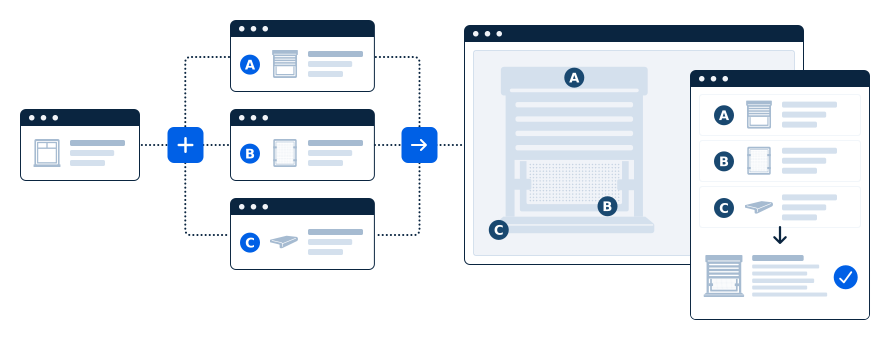
From simple items to complex fenestration products, Fenzon connects master data, technical logic, pricing and visualisation in one shared product model.