
Turn your product range into a digital showroom
Prospects get a structured online overview of the products you actually offer and can move directly into configuration.
Fenzon LeadGen makes your product range digitally accessible: prospects discover products, configure their preferred solution and submit a structured enquiry. If required, this can immediately generate a completed quote – while your sales team spends less time on manual calculations.
LeadGen combines a digital product overview with the depth of a real product configurator. End customers can first explore the range and then configure exactly the products relevant to their enquiry.
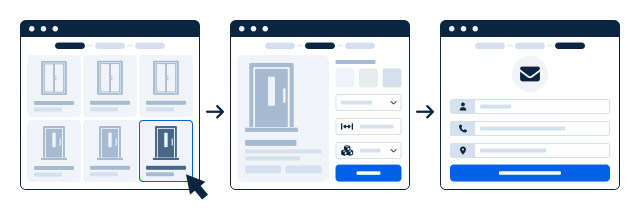
LeadGen uses product data already maintained for configuration and pricing as an additional digital sales channel. Existing product knowledge therefore becomes a public self-service experience with very little extra effort.
Prospects get a structured online overview of the products you actually offer and can move directly into configuration.
The end customer handles product selection and configuration. Your team receives structured results and can focus more on validation, advice and closing the sale.
A lead contains not only contact details but already selected and configured products. You can immediately see what the prospect is genuinely interested in.
Depending on your desired process, LeadGen can stop at the enquiry or continue through to automated quote generation.
The public process deliberately remains simple for prospects even though the same detailed product and pricing logic as Fenzon runs in the background.
The end customer browses the published product range, explores products and categories and selects the required solution.
Dimensions, versions, colours, components and other properties are selected directly in the browser, validated and priced according to the stored product logic.
The selected products are summarised, the prospect adds their contact details and submits the enquiry. Contact, account and quote are created in the backend and your team is notified about the new lead.
LeadGen is configured directly in the Fenzon backend. Products, presentation and public access are set up without having to develop a separate web application.
Choose an individual available identifier for the public page – for example company.leads.fenzon.com. This gives your lead tool a directly accessible address.
You decide which products are offered publicly and which product texts, categories and content end customers can see.
Different layouts and settings for product graphics and other visual details let you adapt the public experience to your preferred presentation.
The end of the enquiry journey can be adapted to your sales process. Different automation levels are possible, from receiving a lead only to sending a finished quote directly.
After submission, the prospect simply receives a confirmation. Your team takes over the generated case in the backend and continues processing it manually.
LeadGen can automatically send the end customer an email confirmation while the generated quote continues to be processed internally.
If the process is to be fully automated, the generated quote can be sent directly to the end customer depending on the configuration. A standard enquiry can therefore be processed through to the quote without a manual intermediate step.
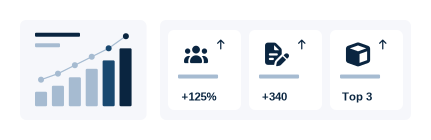
LeadGen automatically provides digital sales KPIs. This shows how intensively the channel is used, how leads develop and which products are viewed most often or included in quotes.
Track how often the public LeadGen experience is visited and used.
See how many quotes are generated through LeadGen, which conversion rates are achieved and how results develop over time.
Monthly trends, quote volume and call volume help identify changes in digital sales and demand early.
For individual products, you can see how often they were viewed, added to quotes and requested in specific quantities. The lead tool therefore also becomes an indicator of real product demand.
The public lead journey can be used as a standalone digital sales channel or embedded into an existing website.
The public Fenzon address can be used on its own and shared directly with prospects, for example in campaigns, emails or sales consultations.
Products, categories or calls to action on your website can link directly to the relevant LeadGen journey.
LeadGen can, for example, be embedded via iFrame in an existing website so the configuration process remains accessible within your own web presence.
The public experience remains under your control. You decide what is published, which languages are available and how the lead journey fits your digital brand presence.
Languages released for LeadGen are based on the maintained language content in your Fenzon tenant and can be activated selectively for the public experience.
Landing-page content, product categories and other public text can be maintained to match your product range and sales approach.
In addition to the available designs and settings, the experience can be extended with custom CSS and optional external scripts where required.
New enquiries are transferred into Fenzon and can also trigger email notifications so the sales team can respond to new prospects immediately.
LeadGen does not create a second product world alongside your internal sales process. Published products use the same centrally maintained product data, configurators, rules and prices. Changes to the product model therefore do not need to be rebuilt for a separate online configurator.
Publish selected products for end customers, automate recurring quoting processes and gain insight into demand and usage at the same time.