

Windows
- Freely configurable window
- Double sliding window
- Single sliding window
- Casement window
- Top-hung window
- Sliding window
- Fanlight window
- Tilt window
- Tilt-and-turn window
- Panoramic window
Fenzon does not reduce complex fenestration products to rigid variant lists. Product data, dimensions, constructions, components, rules, prices and dynamic visualisation work together within one shared configuration logic.
Fenzon provides specialised configurators for key product groups across windows, doors and fenestration. Every product family uses the same platform logic while still supporting its own constructions, components, dimensions, rules and pricing.







Configuration is not an abstract process. Fenzon generates a dynamic product visual from the selected properties and lets users show or hide technical information as needed.
Depending on the use case, products can be viewed from the interior or exterior side.
Depending on whether the product is being viewed visually or technically, dimensions can be shown or hidden directly on the product graphic.
A background can be displayed, for example, to assess the effect of patterned or decorative glazing on transparency and appearance more realistically.
Profiles, hardware, infill panels and accessories form the technical building blocks of a product. Each component can have additional properties and be controlled specifically within the configuration.
Technical parts are maintained centrally as components and assembled into products. This makes them available as reusable building blocks within the configurator.
Components can be extended with parameters where required, for example widths, offsets, dimensions or other technical values.
Components can be equipped with selectable colour properties. For example, a handle can define which colours are available within the configuration.
Component accessories can extend individual parts with additional variants and properties, for example a handle with a lockable version or push button.
Dimensions can be handled in different ways within product configurations. Fenzon supports free entry, preferred standard sizes and preferred sizes, as well as strictly defined fixed dimensions.
Required dimensions are entered freely within the permitted product logic.
Standard or preferred sizes are available for quick selection while free entry remains possible.
Entry is restricted to predefined permitted dimensions and presented as a selection-only model.
A default dimension can be preselected so it is already set when the configuration starts.
The Fenzon rule engine accesses configuration values, geometric properties and commercial information that are generated and updated automatically during configuration. The relevant variables can be selected directly from a menu and used in conditions and formulas.
Check permitted sizes, combinations and technical conditions and can prevent invalid configurations or display targeted guidance.
Respond to the current configuration and automatically adjust prices or surcharges based on defined conditions.
Automatically replace components or generate suitable substitution suggestions as soon as defined conditions are met.
For example when saving, on every change or specifically when a particular property changes.
Access configuration, geometry, commercial values and other technical conditions.
For example block a configuration, display a note or text, trigger a substitution or generate a substitution suggestion.
Price matrices can be structured around constructions, field divisions and opening types. Import, export and automatic population are available for large price grids.
Prices can be stored based on product structure and dimensional grid.
Existing price lists can be transferred quickly into structured price grids.
Price grids can be exported for external editing and imported again afterwards.
Missing values in a sufficiently populated price matrix can be interpolated automatically from the existing price points.
Fenzon can manage related fenestration products as a product combination. A parent element passes relevant dimensions to connected products and keeps the entire combination synchronised when changes occur.
When dimension-relevant properties of the main element change, dependent dimensions are recalculated automatically.
Connected products receive the appropriate dimensions, remain synchronised and can be visualised together in one product graphic.
Combined products can later be separated again for downstream processing, for example when individual products need to be ordered from different suppliers.
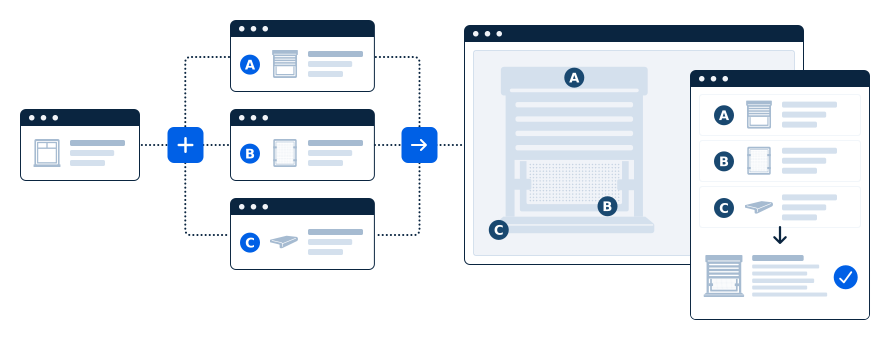
Via the API, Fenzon provides four core output areas. They expose configuration structure, prices, visualisation and descriptions so the same product logic can also be used in custom frontends, e-commerce processes and integrations.
The configuration tree contains available choices, input fields and the current configuration structure.
Pricing returns the calculated price information for the current configuration, including applicable rules and surcharges.
SVG output provides the dynamically generated product visual for the current configuration.
Description output generates structured product descriptions from the configured properties and components.
Use configuration logic in your own applications